Bypassing Two-Factor Authentication

Yet another way two-factor authentication has been bypassed:

For a user to fall prey to Eurograbber, he or she must first be using a computer infected with the trojan. This was typically done by luring the user onto a malicious web page via a round of unfortunate web surfing or email phishing attempts. Once infected, the trojan would monitor that computer’s web browser for banking sessions. When a user visited a banking site, Eurograbber would inject JavaScript and HTML markup into their browser, prompting the user for their phone number under the guise of a “banking software security upgrade”. This is also the key to Eurograbber’s ability to bypass two-factor authentication.

It’s amazing that I wrote about this almost eight years ago. Here’s another example of the same sort of failure.


Original news article at https://www.schneier.com/blog/ on December 11, 2012 at 12:34AM

36 million euros stolen from banking customers across Europe using mobile malware

(LiveHacking.Com) –  A sophisticated and complex attack has been used to systemically steal millions from banking customers, both corporate and private, across Europe. By using a combination of malware for the PC and malware for mobile, the attackers have been able to  intercept SMS messages used by banks as part of their two-factor authentication process. First the attackers would infect the victim’s PC and […]


Original news article at https://www.livehacking.com on December 10, 2012 at 11:56AM

Hong Kong cops open £700k cyber security centre

https://en.wikipedia.org/wiki/Hong_Kong

The Hong Kong government has thrown HK$9 million (£730,000) at a new Cyber Security Centre in a bid to tackle the growing threat to critical infrastructure in the Special Administrative Region of China.

Police commissioner Tsang Wai-hung said at the opening ceremony last Friday that the 27-man centre would be staffed by officers from the small Technology Crime Division and heralded it as the first step towards working more closely with public and private sector organisations.


Original news article at https://news.hitb.org/ on December 10, 2012 at 02:59PM

Over Half Of Chief Information Officers Fail To Test Cloud Vendors’ Security Systems & Procedures

https://www.flickr.com/photos/wili/201307000/

Cybersecurity tops CIO’s concerns, with 84% of CIOs stating that they are either concerned or very concerned about the risks associated with IT security breaches. Yet while security issues remain the biggest concern that CIOs have about migrating their technology functions to the cloud, less than half (45%) test cloud vendors’ security systems and procedures.

Tags: 


Original news article at https://news.hitb.org/ on December 10, 2012 at 02:56PM

DLP: Discover First or Monitor First?

Should I DISCOVER where sensitive/regulated data resides in my environment OR DETECT when it is being leaked? Storage DLP first or network DLP first? Data-at-rest (DAR) first or Data-in-motion (DIM) first? What is more important, knowing WHAT can be stolen and from where OR WHAT is being sent out today?

Sorry, but “IT DEPENDS.” As many tough questions in life, this one has no single right answer. Successful data protection projects, whether for regulated data or corporate secrets, often start from a discovery sweep of an internal network. Looking for PANs, SSNs, known secret documents, customer records or whatever else allows the DLP conversation to start and the “lay of the data land” to become more clear. At the same time, they also often start from observing sensitive and regulated data flows out of your environment via email, FTP, web uploads, etc. This helps jumpstart the DLP discourse and creates a sobering realization of “Whaaaat!? This is going on RIGHT NOW!!?” Both are common and reasonable.

So, why discover first?

  • Learn the extent of sprawl of a particular type of data
  • Assess the complexity of the upcoming data protection effort
  • Gather ammunition for identifying and then engaging the data owners
  • Learn what to include in monitoring policies next

Why monitor first?

  • Observe (and, then, hopefully, stop) the most blatant and obvious leaks
  • Assess the priority of needed data protection efforts based on ongoing data movement
  • Easily get a taste of content-aware DLP technology without too much hard work (!)
  • Learn what to include in discover scans next

As a side note, few organizations would venture into “enforce first” as you need to know BEFORE you can act. Control comes after visibility (and, by the way, in some domain it never really comes…). One can discover first and then reduce, secure, monitor and protect what is discovered. One can also monitor first and then evolve to reduce the exposure. A sole exception I’ve seen is about enforcing something trivial like ‘block all USB access on endpoints’ which is hardly at the core of content-aware DLP.

Finally, if you’d absolutely push me to the wall and make me give a simple answer to a complex question, then go do network monitoring first… mostly because it is easier (= the most similar to netsec technologies) and often produces nasty (and thus deeply motivating) surprises.

P.S. this discussion does not remove the requirement to understand what you are trying to do with DLP and with data security in general. The real FIRST action is always ‘think’, not ‘buy’ or ‘deploy’. Don’t get those ideas :-)

Related posts:


Original news article at https://blogs.gartner.com/anton-chuvakin on December 07, 2012 at 10:15PM

New Accounting System Hack Could Cause ‘Mayhem’

Accounting systemsAttacks against massive and proprietary enterprise accounting systems, in particular financial software such as SAP and Oracle, have been few and far between. That changed at this week’s Black Hat Abu Dhabi conference where a pair of researchers presented proof-of-concept code that could change the dynamic of the financially motivated attack landscape.

read more


Original news article at https://threatpost.com/en_us/frontpage on December 07, 2012 at 09:03PM

MaskMe: create disposable email addresses on the fly

When you register a new account on a website or service you are usually asked to provide it with an email address. You may receive a verification email after the registration, or it may be used to send you notifications or make sure you are a unique user and not the same guy who has created a dozen accounts already on the site.

You can enter your main email address whenever you do that, but that increases the chance that you will be swarmed with spam in the future as some services will sell your information to the highest bidder to make money. A secondary email address for that purpose, or a disposable address that gets created on the fly, is the second option that you have. The benefit here is that you protect your main email address to keep it as spam free as possible.

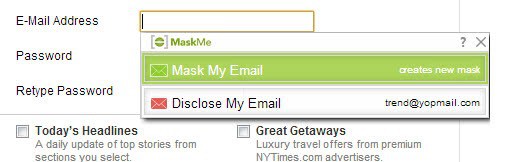
MaskMe is an extension for the Google Chrome browser that helps you create masked emails, that is unique random email addresses that you have no affiliation with, whenever you need them. While you may still use your main email address when signing up on some sites, you get the option to create a new masked email address instead at other times.

mask email

MaskMe displays a popup below the email field on registration pages that gives you the option to register using your main email address, which you select when you create a MaskMe account after installation or a randomly generated unique address that is generated on the fly.

The random email address forwards all emails to your main email address until you block the process in the management console. That’s actually a great way of dealing with it, as you get options to switch between forward and block there as often as you want. You may want to keep forward enabled for instance until you receive the verification message. Once you did, you can switch to block so that no mails get forwarded anymore to your main email address. Should the need arise to receive emails again, for instance when you have lost your account password and need to reset your account, you simply enable forwarding again here to do so.

disposable emails

You can create custom email addresses on the MaskMe account page as well, which is useful if you need to register in third party programs for instance where the automatic generation does not work in for obvious reason.

You may want to check out the service’s settings after installation to make sure everything is set in order. The program can generate strong passwords for you for instance and will also check if the password you have entered during registration may not be strong enough. If you do not need that reminder, for instance if you are using a password manager that does that for you, you can disable that feature in the settings.

The program keeps track of your privacy while you are online, and displays what it records in a privacy timeline on your account page. It basically helps you keep track of where and when you have shared personal information on the Internet. A paid upgrade is available that adds masked phone numbers and mobile access for $5 a month.

Here is a visual demonstration of how MaskMe works


Original news article at https://www.ghacks.net on December 09, 2012 at 12:42AM

Top Security Predictions for 2013

WatchGuard Reveals Top Security Predictions for 2013 — Cyber Attacks Resulting in Human Death, Android Pick-Pocketing Attempts and Rise in Browser-Infecting Malware All Forecasted Next Year SEATTLE, December 5, 2012 — WatchGuard Technologies, a global leader in manageable business security solutions, [has] revealed its annual security predictions … (more)


Original news article at https://www.topix.com/tech/computer-security on December 08, 2012 at 03:42AM

Monitor your wireless network against intruders

There are a couple of things you can do to protect your wireless network against freeloaders and intruders. Probably the best thing right now is to make sure it is protected by a security protocol that is offering the best protection. That is usually WPA2 right now. You also need to make sure that the key is significantly long enough so that it can’t be easily guessed (your cat’s name) or brute forced.

There are a couple of other things that you can do, for instance position the router in a way that reception is bad or not available at all when you are not in the apartment or house. There is also wifi blocking wallpaper and paint available, but that is usually something that companies may want to do.

Another effective option is to monitor your wireless network for new connections. SoftPerfect WiFi Guard is a free program for the Windows operating system that can aid you with that. The program monitors all wireless connections which it displays in the main window.

softperfect wifi guard

Here you find information about the IP address used by the devices, the MAC address, the name, and additional information. The listing provides you with information about all connections, so that you can easily distinguish your own devices from devices that someone else may be using to connect to your wireless network. The program scans the network automatically from time to time and provides you with the means to run manual scans whenever you want to. Devices are pinged automatically which helps you detect systems behind firewalls or other security that blocks ping requests.

Since it is not really practicable to have the window open 24/7, it ships with a notification system in place that informs you whenever unknown devices connect to the wireless network.

The program is dead easy to use and a great option if you are using wireless connections to connect to the Internet, especially if you suspect someone else taking advantage of your wireless setup.


Original news article at https://www.ghacks.net on December 05, 2012 at 04:45PM

Want Microsoft’s Imagine Cup Grant? Combine Devices, Sensors And The Cloud

Microsoft’s Imagine Cup rewards student innovators with thousands of dollars worth of prizes, the chance to network with other entrepreneurs and valuable experience. But to develop those skills into a viable business can require additional funding, and Microsoft’s Imagine Cup Grant winners, announced Tuesday, now have that.

Team Graphmasters of Germany walked away with $100,000 in cash, which the company will use to develop a navigation system using Windows Phone and Microsoft’s cloud technology, Windows Azure. Team Stethocloud placed second, walking away with a $50,000 prize for its mobile-hybrid stethoscope that can be used to detect childhood pneumonia via the cloud.

See the similarities? The company is funding startups that combine a client sensor, like a phone, with the combined knowledge of the cloud. In fact, every team that Microsoft funded combined a Windows Phone with Windows Azure.

According to a Microsoft representative, each team was judged based on four criteria:

  1. Project impact and viability (40%), including whether or not the solution would be technically and economically viable.
  2. Team quality and motivation (30%), concerning how the team is structured, and how capable it appears to be to overcome obstacles.
  3. Solution design (20%), or how novel the solutuion is.
  4. Defining the problem (10%), or how broad the problem that the team is solving actually is.

Imagine Cup Grants are a three-year, $3 million competitive grants program that provides opportunity for young people by helping them realize their vision of bringing their technology enabled projects to life, according to Microsoft. Grant recipients receive funding, access to resources and support to help them create a business or nonprofit organization. The Imagine Cup Grants are part of Microsoft YouthSpark, a global initiative that aims to create opportunities for 300 million youth in more than 100 countries during the next three years.

Graphmasters: Solving Traffic Problems, Collaboratively

According to Christian Brueggemann, who is involved in the technical development of the algorithms behind Team Graphmasters, the company began life as an academic project, natch, which competed in the Imagine Cup about four years ago.

The company’s first product – originally dubbed “Greenway” and now known as “Nunav,” uses a combination of cloud services and devices not to route drivers to their destination via the shortest, most optimized route, but to send them along a variety of paths to minimize total congestion. That, in turn, can cut the amount of time all drivers spend idling in traffic, reducing congestion and the corresponding increase in greenhouse gases from wasted gas. In a hypothetical example, one car can produce 2.5 tons of carbon dioxide per year – enough that a forest of 200 trees would be needed to consume it all. In total, the CO2 output from the world’s cars would require a forest the size of Australia.


Rival navigation systems, according to Brueggemann, are reactive: a driver’s GPS device encounters a traffic jam, reports it, is rerouted, possibly encounters another traffic jam, and the process repeats itself. What Nunav attempts to do, he said, was to proactively assign drivers to side streets, so that every driver wasn’t trying to fit through the same high-speed bottlenecks. (It’s worth noting that Graphmasters’ examples focused on cities, where a number of relatively equal alternative routes present themselves.)

“A reactive system routes drivers around traffic jams that already exist, and when the traffic jam exists, you already have the problem,” Bruggemann said.

All Nunav needs is about 1% of the cars on the road to communicate and respond to create a detailed traffic overview, and about 10% of the GPS infrastructure. “The strategy we’re making is to get our service into the navigation systems alrady in the market, because once we do that it will be very easy to get 10% of users,” Bruggemann said. That doesn’t necessarily mean only Windows Phones, but all GPS devices.

And what’s the business model? It’s a new one: Nunav charges for the accelerated route. Yes, it’s only $.10 or so, which Graphmasters promises will be made up for by reduced stress.

Stethocloud And Winsenga

The same strategy – the cloud plus a device – drove the introduction of Stethocloud, a nifty app developed by four students from Australia. The team created a digital stethoscope that could be plugged into the audio jack of a smartphone. The goal is to help diagnose and treat pneumonia. 


After a user enters some basic information about the child, such as the date of birth, the app asks the parent or doctor to hold the stethoscope up to eight points on the child’s chest, “listening” and then uploading the sound file to the cloud. An algorithm then determines whether or notthe child has pneumonia, and advises a course of treatment.

That same approach was used to develop Winsenga, which combines a high-performance microphone placed within a Pinard horn, rural Africa’s answer to the stethoscope. Without access to ultrasound machines, doctors and nurses have to rely on their own ears to determine if a fetus is alive, and what problems there might be. The app listens to the heartbeat, diagnoses any problems and issues an alert if needed.


Team Vivid from Egypt and Team QuadSquad from Ukraine each won $50,000 to form companies that can access healthcare records from mobile devices, as well as help disabled individuals speak more effectively.

The message here is clear: Microsoft is looking for developers focused on using devices as a local sensor and tapping into the cloud for specialized intelligence and additional computing horsepower. Whether it’s Microsoft technology talking to Microsoft services, or something like Symbian talking to an Amazon Web Services hosted application running within Amazon’s cloud, the company sees the combination of local sensors and back-end intelligence as a powerful trend it wants to encourage.


Original news article at https://readwrite.com on December 05, 2012 at 06:30PM