Shipping Industry Cybersecurity: A Shipwreck Waiting to Happen

The global shipping industry is vulnerable to a range of hacks, including one that can send multi-million dollar vessels on a collision course for disaster, according researchers. Worse, the flaws are trivial to execute and easy to mitigate against, according to a report by Pen Test Partners.

“Ship security is in its infancy – most of these types of issues were fixed years ago in mainstream IT systems,” said Pen Test Partners researcher Ken Munro, in a report on the findings released this week. “The advent of always-on satellite connections has exposed shipping to hacking attacks. Vessel owners and operators need to address these issues quickly, or more shipping security incidents will occur. What we’ve only seen in the movies will quickly become reality.”

As part of its report, Pen Test Partners also released a number of proof-of-concept (PoC) attacks where it demonstrated multiple techniques for disrupting the shipboard navigation systems. “We’ve broken new ground by linking satcom terminal version details to live GPS position data,” according to the report.

Munro said that the PoC flaws are the tip of the iceberg. Many more worse issues were uncovered. He said other bugs would be shared privately with vendors.

Forcing Ships Off-Course

In one of the PoCs shared in the report, researchers noted that the electronic charts that are used to navigate, called Electronic Chart Display and Information System (ECDIS), are a ripe target for hackers. They said the ECDIS is not difficult to hack and manipulate once an attacker breaches the vessel’s network. And that’s fairly simple to achieve because of an abundance of outdated OS and poorly protected configuration interfaces, researchers said.

“We tested over 20 different ECDIS units and found all sorts of crazy security flaws,” Munro said. “Most ran old operating systems, including one popular in the military that still runs Windows NT.”

As hackable as it is, all too often, the ECDIS is left in charge of steering the ship, researchers said.

“[ECDIS] can slave directly to the autopilot – most modern vessels are in ‘track control’ mode most of the time, where they follow the ECDIS course,” Munro explained. “Hack the ECDIS and you may be able to crash the ship, particularly in fog. Younger crews get ‘screen-fixated’ all too often, believing the electronic screens instead of looking out of the window.”

In one PoC example, once an adversary gained access to the shipboard IT infrastructure, a hacker could fool the ECDIS into thinking that the GPS receiver was in a different location on board. That would effectively spoof the ship’s navigational systems to believe the ship was in a different place on the water. The system could then automatically “correct” the course, thus sending the ship off into the wrong direction.

The team was also able to expand the perceived GPS footprint to make the ECDIS think the ship was a kilometer wide, wreaking havoc with anti-collision systems. The AIS transceiver, responsible for collision alerts, uses ECDIS data to not only send out the ship’s location to other vessels if there’s a perceived danger, but also for receiving the same data back. By tricking the system into thinking a collision is imminent, other ships could alter their own courses, jamming up shipping lanes.

“Other ships’ AIS will alert the ship’s captain to a collision scenario,” Hunt said. “It would be a brave captain indeed to continue down a busy, narrow shipping lane whilst the collision alarms are sounding.”

The implications here are profound: “Block the English Channel and you may start to affect our supply chain,” Hunt added.

The researchers also found that it’s possible to hack the systems used to control the steering gear, engines, ballast pumps and more. These communicate using NMEA 0183 messages, which are sent in plaintext, with no message authentication, encryption or validation.

“All we need to do is man-in-the-middle and modify the data,” Hunt said. “This isn’t GPS-spoofing, which is well known and easy to detect, this is injecting small errors to slowly and insidiously force a ship off course.”

Real-World Implications

Barry Greene, principal architect at Akamai, said that a range of actors could make very good use of these kinds of attacks.

“It can be used (and most likely is being used) to track state intelligence interest,” he told Threatpost. “Criminal threat actors would look for ways to ‘monetize.’ If there is money, they will find a way to exploit. Corporate intelligence threat actors would (and most likely are) using these exploits to track competition. Activist threat actors would use it to track illegal shipping: banned animal products, weapons and human trafficking.”

He added that there are other, less obvious consequences.

“The ugly part is logical consequences that are not being considered,” he told us. “Think about the current pirate situation in several parts of the world. These pirates can use this information for their intelligence. What would be the response when someone gets killed in the Straits of Malacca by pirates who are using these exploits to target their hits?”

Further illustrating the real-world implications, Pen Test Partners has managed to link version details for ships’ satcom terminals to live GPS position data, to establish a clickable map where vulnerable ships can be highlighted with their real-time position (it’s not updated however, thus ensuring it remains out of date and useless to hackers).

All Back to Password Hygiene

In order to carry any of the above attack scenarios out, threat actors would need to gain access to the vessel networks in the first place. Unfortunately, that proves to be fair simple as well, given that satcom terminals on ships are available on the public internet. Many have default credentials, Hunt explained, admin/1234 being the most common. And failing to set a strong administrative password opens the door to a raft of security issues.

“It’s an easy way to hijack the satellite communications and take admin rights on the terminal on board,” explained Munro.

Looking into a Cobham (Thrane & Thrane) Fleet One satellite terminal, Munro found a number of exploitable flaws. For starters, the admin interfaces communicate via insecure telnet and HTTP. They also lack firmware signing, making it possible to edit the entire web application running on the terminal. There is also no rollback protection for the firmware, so a hacker could elevate privilege by installing an older, more vulnerable firmware version. Lastly, the administrator interface passwords are embedded in the configurations, hashed with unsalted MD5.

All of these flaws (again, easily fixed with a strong password) offer routes into the vessel’s network; and, thanks to a general lack of network segregation on board most ships, attackers can likely easily pivot to the navigation system, Munro pointed out.

Mitigation

Like all sectors, getting serious about the risk to their industry should be on the to-do list of vendors and shipping companies alike. However, that’s easier said than done.

“Hopefully, these findings will encourage action, but the reality is that most people who need to know about this risk within the shipping/container/port industry may not hear about this report,” said Greene. “They live in their own specialized community…There is a whole industry built around the shipping industry who never thinks about security. They are thinking, ‘how do I build this function to manage the container lift during the time it is pulling the container off the ship.’”

A good place to start, he added, is for shipping companies to pull in vendors for meaningful security conversations. “Their security interest would wake up the vendor to put security on the top of their list,” Greene explained, adding that shipping companies should make use of their existing resources.

“Their number one security talent is the specialist within their organizations,” he said. “They know their industry. They know their business. CxOs should take those teams, pull them off to the side for a couple of days and have them ‘think like hackers.’ They will come back with a list of security priorities that would be better tuned to the shipping/container/port industry.”

Read the Full Article here: >threatpost – The First Stop for Security News

Hacker takes down Copenhagen’s bike-hire network and deletes database

Copenhagen’s bike network was rendered useless in a cyber attack over the weekend in which the hacker was able to completely wipe the network’s database. Officials claim that the attack happened some time between 4 May and 5 May, and meant that people were not able to hire bikes from the Bycyklen system – similar to London’s ‘Santander Hire’ bike hire system, except that the bikes have built-in electric motors.

Read the Full Article here: >Computer Security News

This Highly Popular Android App Converts Your Video To Audio Easily On The Move

A 5-minute high-definition music video can easily take up a space of more than 45 megabytes but an mp3 file of the same length, say, at a bitrate of 128 kbps, may just consume 5 megabytes of mobile storage, that is 9 times lesser.

If your mobile storage is running out due to keeping many video files, it’s time to convert them into audio to save space when you just want to play or share music files without needing videos.

To do that, many converters are available for you but Video to MP3 Converter offered by AccountLab is one of the most popular with more than 10 million downloads from the Google Play Store.

The Converter is very easy to use for average users with a slider to adjust the sound quality without bothering the terms of VBR and CBR. For more demanding users, it provides a selection of various bitrates for sound encoding in advanced mode.

As a bonus, the app also incorporates a video cutter and an audio cutter, both are easy to operate.

The app available on Android devices is free to download and use with supporting ads  Read More

Read the Full Article here: >Gizmos Freeware Reviews

FBI: Cyber-Fraud Losses Rise to Reach $1.4B

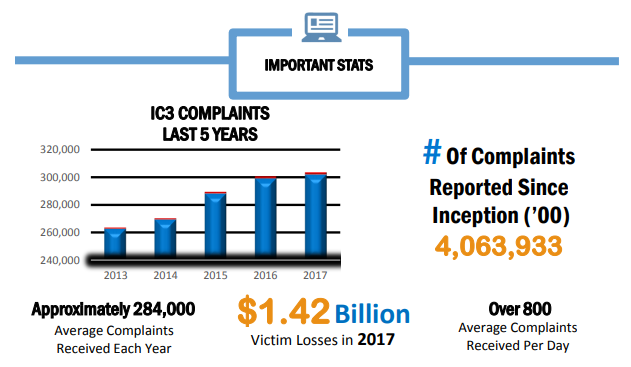
About 301,580 consumers reported cyber-fraud and malware attacks to the FBI’s Internet Crime Complaint Center (IC3) last year – with reported losses exceeding a whopping $1.4 billion.

The year’s haul of reports brings the overall total of complaints since the IC3 began recording such things to 4 million.

Top threats for the year include well-worn trends like whaling, phishing and ransomware, but also tech support fraud, confidence games involving romance themes, non-payment scams and also straightforward extortion.

Notable Stats

Whaling, a.k.a. business email compromise, made up the bulk of the complaints for the department, with 15,690 individuals affected and accounting for adjusted losses of more than $675 million. In these cases, criminals masquerade as company executives to request a change in account information for wire transfers in order to siphon off money to their own accounts, or to request for personally identifiable information or W-2 form data for employees. In 2017, the real estate sector was in particular heavily targeted, IC3 said.

Tech-support fraud, where criminals pose as a variety of different security, customer or technical support reps offering to resolve any number of (non-existent) issues, took the crown for growth. Reported incidents spiked to 10,949 complaints and claimed losses reached nearly $15 million, which represents a staggering 90 percent increase from 2016. IC3 received complaints from victims in 85 different countries.

There are of course many variations of this scam, but IC3 said that the bad actors are now changing up their tactics to use phishing emails with malicious links or fraudulent account charges to lure their victims. They’re also offering new “services,” such as income tax assistance, GPS help, printer support, cable company updates or support for virtual currency exchanges. In some variations, criminals are posing as government agents, who (oh the irony!) offer to recover losses related to tech support fraud schemes; or, they may request financial assistance with “apprehending” criminals.

Other stats of note for 2017 include the fact that the IC3 received 1,783 complaints identified as ransomware last year, with adjusted losses of over $2.3 million. It also received 14,938 extortion-related complaints, with adjusted losses of over $15 million.

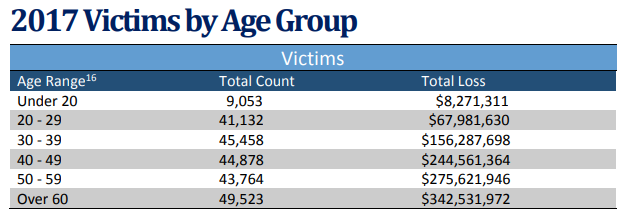
When it comes to demographics, older Americans seem to be more targeted: There were 49,523 complaints from victims over the age of 60 with adjusted losses in excess of $342 million.

Fraud Gets Elaborate

The IC3 also uncovered a few “long-cons” that indicate the lengths to which fraudsters will go to scam their marks. Consider the case of an international investment scheme involving the impersonation of Branch Banking & Trust (BB&T) and JPMorgan Chase executives, the fabrication of U.S. government documents, the creation of fraudulent investment agreements in the name of the banks, and the purchase of luxury vehicles to launder the proceeds of the scheme. It resulted in losses of more than $7 million from victims in more than 20 countries.

In this case, West African operators essentially duped unwitting victims into believing they would receive millions of dollars of investment funding as part of joint ventures with BB&T or Chase. They set about spoofing bank domains and recruiting U.S. citizens to pose as bank “representatives” at in-person meetings with the victims; and fake U.S. government documents were used to convince the victims that the government was sponsoring the investment agreements. The victims were then asked to pay tens of thousands of dollars (often hundreds of thousands of dollars) to U.S.-based bank accounts on the belief that such payments were necessary to effectuate their investment agreements.

The scam was partially broken up by FBI Houston as a result of the mounting number of complaints and forensic data. Only about $200,000 of the cash has been recouped.


Read the Full Article here: >threatpost – The First Stop for Security News
First look at Google Chrome’s UI design refresh

Users of Google Chrome Canary, the cutting edge version of Google’s web browser, have a chance to get a sneak peek of a user interface design refresh that Google may plan to launch in all versions of Chrome eventually.

The feature is hidden behind a flag currently but that is a common practice by Google; the company uses flags to hide future features from the general population. While there is no guarantee that features will land in Chrome one day, it is often the case that Google uses experimental flags to prepare the wider release.

Chrome’s user interface has not changed all that much throughout the years. Google started a Material Design refresh of internal Chrome pages in 2015 and the process is still ongoing. The company changed the design of the Settings page in mid-2017, and the flags page in the end of 2017.

Google Chrome’s UI design refresh

chrome new ui material design

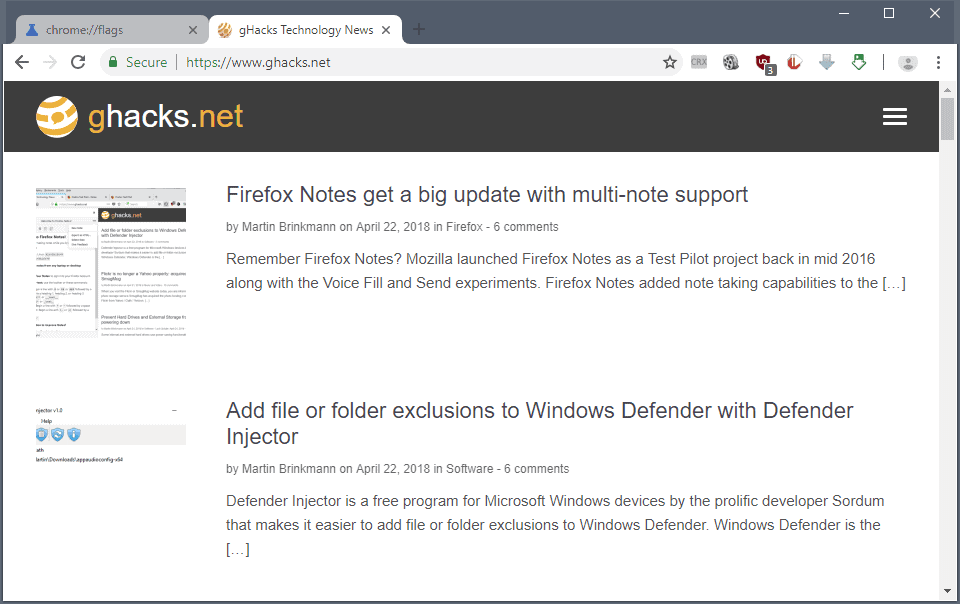
The screenshot above shows the new refreshed Material Design front user interface of Google Chrome. The very first thing you may notice is that Chrome’s tabs are slightly rounded now instead of sharp edged.

Tabs retain the rounded look even if you create a tab overload situation in Chrome when you open too many tabs so that each is displayed without any site indicator (as Chrome does not use scrolling in the tab bar).

The tabbar itself has a white background now. Inactive tabs are displayed with gray text on a gray background, the active tab with gray text on a white background.

There are other changes:

  • The design of the New Tab button changed to a plus icon.
  • The Chrome address bar has round edges, and its background is set to gray and not white anymore.
  • The profile indicator was moved from its original position near the window controls to the main Chrome toolbar.

How to enable the design refresh

chrome design refresh

You need to run Chrome Canary (version 68 or later) on Windows right now to enable the refresh. If the design refresh is not pulled again, it will become available for Mac or Linux as well in the future.

  1. Load chrome://flags/#top-chrome-md in the Chrome’s address bar. The address opens the experimental page of Chrome.
  2. The preference UI Layout for the browser’s top chrome determines the user interface design. Click on the menu next to it and select Refresh.
  3. Restart Google Chrome.

You can undo the change at any time by setting it to the default value. Other values that are supported:

  • Normal — clamshell devices.
  • Hybrid — for devices with touchscreen.
  • Touchable — new unified interface for touch and convertibles.
  • Auto — unclear.

Closing Words

The UI design refresh of Chrome is a work in progress. While it is likely that Google is going to launch a refresh of the design eventually, it is possible that it will look different from the first version that popped up in Chrome Canary in the past days.

Mozilla, maker of Firefox, moved away from rounded tabs with the release of Firefox 57.

Now You: what is your take on the new UI design?

Summary

Article Name

First look at Google Chrome’s UI design refresh

Description

Users of Google Chrome Canary, the cutting edge version of Google’s web browser, have a chance to get a sneak peek of a user interface design refresh that Google may plan to launch in all versions of Chrome eventually.

Author

Martin Brinkmann

Publisher

Ghacks Technology News

Logo


Read the Full Article here: >Top 100 Network Security Tools

Hackers Found Using A New Code Injection Technique to Evade Detection

While performing in-depth analysis of various malware samples, security researchers at Cyberbit found a new code injection technique, dubbed

Early Bird

, being used by at least three different sophisticated malware that helped attackers evade detection.

As its name suggests, Early Bird is a “simple yet powerful” technique that allows attackers to inject malicious code into a legitimate process before its main thread starts, and thereby avoids detection by Windows hook engines used by most anti-malware products.

The

Early Bird

code injection technique “loads the malicious code in a very early stage of thread initialization, before many security products place their hooks—which allows the malware to perform its malicious actions without being detected,” the researchers said.

The technique is similar to the

AtomBombing code injection technique

that does not rely on easy-to-detect API calls, allowing malware to inject code into processes in a manner that no anti-malware tools can detect.

How Early Bird Code Injection Works

Early Bird code injection method relies on a Windows built-in APC (Asynchronous Procedure Calls) function that allows applications to execute code asynchronously in the context of a particular thread.

Here’s a brief step-by-step explanation of how an attacker can inject malicious code into a legitimate process in a way that it gets executed earlier before an anti-malware program starts scanning.

  • Create a suspended process of a legitimate Windows process (e.g., svchost.exe)
  • Allocate memory in that process (svchost.exe) and write the malicious code into the allocated memory region,
  • Queue an asynchronous procedure call (APC) to the main thread of that process (svchost.exe),
  • Since APC can execute a process only when it is in an alertable state, call NtTestAlert function to force kernel into executing the malicious code as soon as the main thread resumes.

According to the researchers, at least three following-mentioned malware were found using Early Bird code injection in the wild.

  • “TurnedUp” backdoor, developed by an Iranian hacking group (APT33)
  • A variant of “Carberp” banking malware
  • “DorkBot” malware

Initially

discovered

by FireEye in September 2017, TurnedUp is a backdoor that is capable of exfiltrating data from the target system, creating reverse shells, taking screenshots as well as gathering system information.

Dates back to 2012,

DorBot

is botnet malware distributed via links on social media, instant messaging apps or infected removable media and is used to steal users’ credentials for online services, including banking services, participate in distributed denial-of-service (DDoS) attacks, send spam and deliver other malware to victims’ computers.

Researchers have also provided a video demonstration, which shows the new Early Bird code injection technique in action.

Read the Full Article here: >The Hacker News [ THN ]

Hackers Found Using A New Code Injection Technique to Evade Detection

While performing in-depth analysis of various malware samples, security researchers at Cyberbit found a new code injection technique, dubbed

Early Bird

, being used by at least three different sophisticated malware that helped attackers evade detection.

As its name suggests, Early Bird is a “simple yet powerful” technique that allows attackers to inject malicious code into a legitimate process before its main thread starts, and thereby avoids detection by Windows hook engines used by most anti-malware products.

The

Early Bird

code injection technique “loads the malicious code in a very early stage of thread initialization, before many security products place their hooks—which allows the malware to perform its malicious actions without being detected,” the researchers said.

The technique is similar to the

AtomBombing code injection technique

that does not rely on easy-to-detect API calls, allowing malware to inject code into processes in a manner that no anti-malware tools can detect.

How Early Bird Code Injection Works

Early Bird code injection method relies on a Windows built-in APC (Asynchronous Procedure Calls) function that allows applications to execute code asynchronously in the context of a particular thread.

Here’s a brief step-by-step explanation of how an attacker can inject malicious code into a legitimate process in a way that it gets executed earlier before an anti-malware program starts scanning.

  • Create a suspended process of a legitimate Windows process (e.g., svchost.exe)
  • Allocate memory in that process (svchost.exe) and write the malicious code into the allocated memory region,
  • Queue an asynchronous procedure call (APC) to the main thread of that process (svchost.exe),
  • Since APC can execute a process only when it is in an alertable state, call NtTestAlert function to force kernel into executing the malicious code as soon as the main thread resumes.

According to the researchers, at least three following-mentioned malware were found using Early Bird code injection in the wild.

  • “TurnedUp” backdoor, developed by an Iranian hacking group (APT33)
  • A variant of “Carberp” banking malware
  • “DorkBot” malware

Initially

discovered

by FireEye in September 2017, TurnedUp is a backdoor that is capable of exfiltrating data from the target system, creating reverse shells, taking screenshots as well as gathering system information.

Dates back to 2012,

DorBot

is botnet malware distributed via links on social media, instant messaging apps or infected removable media and is used to steal users’ credentials for online services, including banking services, participate in distributed denial-of-service (DDoS) attacks, send spam and deliver other malware to victims’ computers.

Researchers have also provided a video demonstration, which shows the new Early Bird code injection technique in action.

Read the Full Article here: >The Hacker News [ THN ]

Portspoof – Spoof All Ports Open & Emulate Valid Services

The primary goal of the Portspoof program is to enhance your system security through a set of new camouflage techniques which spoof all ports open and also emulate valid services on every port. As a result, any attackers port scan results will become fairly meaningless and will require hours of effort to accurately identify which ports have real services on and which do not.

Portspoof - Spoof All Ports Open & Emulate Valid Services

The tool is meant to be a lightweight, fast, portable and secure addition to any firewall system or security system. The general goal of the program is to make the reconnaissance phase as slow and bothersome for your attackers as possible. This is quite a change to the standard 5s Nmap scan, that will give a full view of your systems running services.


Techniques Used by Portspoof

All configured TCP ports are always open

Instead of informing an attacker that a particular port is in a CLOSED or FILTERED state a system running Portspoof will return SYN+ACK for every connection attempt, spoof all ports open.

Result: As a result it is impractical to use stealth (SYN, ACK, etc.) port scanning against your system, since all ports are always reported as OPEN. With this approach it is really difficult to determine if a valid software is listening on a particular port.

Every open TCP port emulates a valid services

Portspoof has a huge dynamic service signature database, that will be used to generate responses to your offenders scanning software service probes.

Scanning software usually tries to determine a service that is running on an open port. This step is mandatory if one would want to identify port numbers on which you are running your services on a system behind the spoofed ports. For this reason, Portspoof will respond to every service probe with a valid service signature, that is dynamically generated based on a service signature regular expression database.

Result: As a result an attacker will not be able to determine which port numbers your system is truly using.

Portspoof Port Spoofing Tool Features

The most important features that Portspoof has:

  • Portspoof is a userland software and does not require root privilege
  • Binds to just one TCP port per a running instance
  • Easily customizable through your iptables rules
  • Marginal CPU/memory usage (multithreaded)
  • More than 9000 dynamic service signatures are supported

If you choose to, Portspoof can be used as an ‘Exploitation Framework Frontend’, that turns your system into a responsive and aggressive machine. This means exploiting your attackers’ tools and exploits in response to a port scan.

You can download Portspoof here:

portspoof-v1.3.zip

Or read more here.

Read the Full Article here: >Darknet – The Darkside

ShiftLeft: Fully automated runtime security solution for cloud applications

When talking about data loss prevention, the first thing that comes to mind are solutions aimed at stopping users from moving sensitive documents/data out of a network.

But there is a different type of data loss that app developers should be conscious and worry about: cloud applications inadvertently sending critical data to unencrypted/public databases/services.

Fuelled by the adoption of microservices and short software development cycles, this is the fastest growing problem in application security today. Recent data leakage incidents experienced by Uber (when 57 million records were breached because developer credentials were accidentally leaked into GitHub) or Wag Labs (when the dog walking service publicly leaked customer’s addresses and lockbox key codes to their corporate website) prove this point.

So how can you prevent such an incident from happening to you?

ShiftLeft is a relatively new offering that provides fully automated secure development and runtime protection for cloud applications.

shifleft security

Main dashboard

It extracts “Security DNA” from applications, maps how sensitive data is flowing from applications to data sinks and shows you how that flow is being handled, and shows potential problems: data leaks, but also unknown vulnerabilities in the customer’s proprietary code and know (CVEs associated) vulnerabilities in open source code that the app takes advantage of.

A new approach

Traditional technologies for protecting sensitive data –  Data Loss Prevention solutions, Cloud Access Security Brokers, Web Application Firewalls – are widely used by enterprises and they are typically deployed between users and the Internet to monitor and prevent data leakage.

But they have their limitations. For example, they may not identify all sensitive data and can be defeated by encryption and obfuscation. An application can also leak sensitive data by accidentally writing secrets to an API that is not monitored by DLP. And let’s not forget that there are ways to get data outside of the organization without going through the Internet.

ShiftLeft approaches the problem from another vantage point: it starts tracking the data between an application (where the sensitive data originates and is processed) and its outputs (where it’s stored/published/delivered).

shifleft security

Data flow topology view

How ShiftLeft works

ShiftLeft uses a two-pronged approach for monitoring an application:

  • It uses semantic graphing to understand how an application works and extract its Security DNA for each of its iterations/builds, and
  • Runtime monitoring, which leverages that graph, is used to understand which parts of the application instruments in real time.

The Security DNA is used to create a custom microagent to be installed in the runtime environment. It will provide runtime protection by blocking sessions that may lead to security issues and/or by providing precise and actionable information for developers so they can quickly fix vulnerabilities and leaks.

“In addition to the runtime protection, because we have the insights from production, we help the developers prioritize which vulnerabilities to fix first with low MTTR, and even provide the exact lines of code in question. By understanding both the dev and production environments, we can definitely conclude when a vulnerability is real,” ShiftLeft CTO Chetan Conikee explained to Help Net Security.

If that in itself is not enough to make you interested, also consider this information:

ShiftLeft can quickly scan each version of the application that’s been pushed into production and automatically extract all security relevant aspects but does not impact continuous application delivery.

New issues can be detected in seconds or minutes (depending on the complexity of the application) but the app’s runtime in not heavily affected because the solution does not instrument the entire surface of the app, just the areas where data is leaking or an attacker can take control of the application.

Also, the solution provides no false positives. “Because we understand how the application works and we know which variables names are sensitive, we can track how they flow across each microservice. Hence we can map their journey and see how they are handled (i.e. encrypted vs. decrypted) and all of their entry and exit points,” Conikee told us.

shifleft security

Example of a data leakage, with the exact line of code that needs to be updated

Good to know

ShiftLeft is aimed primarily at securing cloud-based workloads (cloud applications and microservices).

“The hard limitations are more about language support,” Conikee pointed out. At the moment, ShiftLest supports Java. .Net support is coming in Q2 2018, and that for Python, Go and Javascript will follow shortly thereafter.

“We find that web applications are more likely to have fully embraced modern development practices (agile, cloud, CI/CD, microservices, etc.),” he noted.

“While these practices unlock tremendous innovation in the software development life cycle, they also make security more complex and decrease the time in which security teams have to find and fix vulnerabilities as the pace of releases increase from quarterly to monthly to weekly or even daily. While many other aspects of software development have become automated, security predominantly still relies on manual processes. Hence, it is falling further and further behind.”

DevOps or operations are usually the primary users of the solution – they are the ones who will regularly monitor the application and be on the receiving end of alerts. The developers are on the receiving end of tickets created by the former, but the task of fixing the underlying vulnerabilities in the code is made much easier because the production data weeds out the false positives and the developer knows exactly which line of code needs to be updated.

The security team is involved in the process inasmuch as they are involved in setting the policy that determines the thresholds they are confortable with for various security problems.

Conclusion

Increasingly shorter software development cycles often mean less time to spot and fix potentially dangerous changes that are introduced in the code. Automated discovery is, therefore, a must and each new build has to be subjected to it.

The process has to be quick and the results have to be granular, to allow for helpful insights and speedy remediation. ShiftLeft can provide all of that.

Read the Full Article here: >Help Net Security – News

Use SetupDiag to diagnose Windows 10 upgrade issues

SetupDiag is a free diagnostic tool by Microsoft that is designed to find and parse Windows 10 setup log files to determine why an upgrade or update failed to install on a computer system.

The program can be run on the computer that failed to upgrade or on another computer if relevant log files are available (for example, by copying them to the PC).

SetupDiag works only on devices running Windows 10. The second requirement is that it depends on the Microsoft .NET Framework 4.6 which needs to be installed on the device it is run on.

With the upcoming Windows 10 version 1803 just around the corner, it may be the right tool to have in your arsenal if you run into upgrading issues.

Using SetupDiag

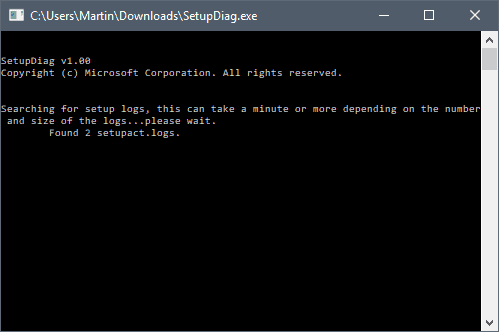
setupdiag

You can run SetupDiag directly after download. If you run it without parameters, it attempts to locate log files that Windows 10 creates during the upgrade process in the default folders on the device.

The program creates a results.log file in its directory when it completes the scan which includes upgrade issues that it detected in the log files during parsing.

SetupDiag creates a zip archive of all log files that it processed on top of that which it saves as Logs.zip in the same directory as well.

The command line window lists those as well, but the window is closed automatically when the program finishes the scan.

Check out our list of Windows 10 upgrade log files to find out more about those. Basically, what SetupDiag does is parse the following directories for log files:

  • \$Windows.~bt\sources\panther
  • \$Windows.~bt\Sources\Rollback
  • \Windows\Panther
  • \Windows\Panther\NewOS

You may run the application in offline mode to parse folders copied from another device. The tool parses one folder only if you copy individual folders, but if you copy the parent folder, it will include all logs found in all directories of the directory structure.

SetupDiag can also be used to debug minidump files that Windows 10 may create during the upgrade process. Windows 10 creates the file setupmem.dmp either in %SystemDrive%$Windows.~bt\Sources\Rollback or in %WinDir%\Panther\NewOS\Rollback depending on when the upgrade process is stopped.

Here are some examples:

  • SetupDiag.exe — the core command. It will run in online mode which means that it tries to find upgrade logs on the target machine in the directories mentioned above.
  • SetupDiag.exe /Output:C:\SetupDiag\Results.log /Mode:Offline /LogsPath:D:\Temp\Logs\LogSet1 – the command runs SetupDiag in offline mode. It will scan the directory LogSet1 for matching log files and issues.
  • SetupDiag.exe /Output:C:\SetupDiag\Dumpdebug.log /Mode:Offline /LogsPath:D:\Dump — the command analyzes the setupmem.dmp file found in d:\dump.

How it works

SetupDiag uses a set of rules files to find matches in upgrade logs. Rules have a name and associated unique identifier.

The reliance on rules means that SetupDiag can only identify issues that are defined in its set of rules. Microsoft lists a total of 26 unique identifiers on the Microsoft Docs website which SetupDiag identifies in its current version.

If the program fails to find the root cause for the upgrade issue, check out our how to analyze Windows 10 upgrade errors guide which offers information on diagnosing issues manually.

Closing Words

SetupDiag may speed up the diagnosing of upgrade related issues on Windows 10 machines significantly. It reduces the time it takes to parse the log files but may still require additional research to repair the detected issue.

Some issues, like not enough disk space, are easy enough to fix but others may require extensive research and repair operations.

Now You: Did you run into Windows 10 upgrade errors in the past?

Summary

Article Name

Use SetupDiag to diagnose Windows 10 upgrade issues

Description

SetupDiag is a free diagnostic tool by Microsoft that is designed to find and parse Windows 10 setup log files to determine why an upgrade or update failed to install on a computer system.

Author

Martin Brinkmann

Publisher

Ghacks Technology News

Logo


Read the Full Article here: >Top 100 Network Security Tools