Google Releases OnHub Smart Router for $200, With Dedicated App

Today, Google has announced a new Wi-Fi router in partnership with TP-Link. The router, called OnHub, that aim’s to be a smarter way to handle your home network.

The router comes with a few handy features, including automatically optimizing what channel you use based on your needs. You can also set certain devices to get priority speeds, so if you want to make sure your Chromecast doesn’t slow down just because someone else is watching YouTube in another room, you can make give the TV priority.

All of the router’s functions are handled by the Google On companion app. Rather than having to log in to an obscure administrator panel, the mobile app allows you to control the router directly from your phone. You can set up the router, see connected devices, and choose and share passwords right from your phone.

The OnHub router is now on sale from the Google Store. At $200, it’s pricier than your typical home router, but for the convenience and features it offers, it may be worth the price. Particularly if it saves you some calls from confused family members who don’t speak the language of blinking router lights.

OnHub | Google via Android Police

via https://ift.tt/1MAQtcJ

Why Is Windows 10’s “System” Process Using So Much RAM?

Why Is Windows 10's "System" Process Using So Much RAM?

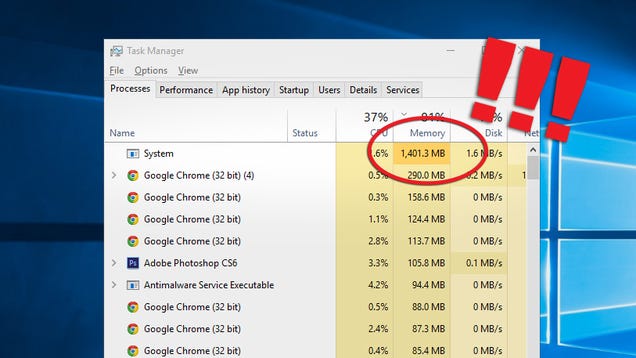
If you’ve made the jump and updated to Windows 10, you might have noticed something strange: the System process sometimes takes up an insane amount of RAM, possibly over 1GB. That’s actually not a bug, it’s a feature of Windows 10. Here’s how it works.

Before we explain what’s going on in the new versions of Windows, let’s talk about how previous versions of Windows have handled memory usage. You only have so much space in RAM to store data. If you fill up your computer’s memory, Windows would offload the least used pages of data to the pagefile, which resides on your hard drive.

The downside to this method is that if you need to use data from your pagefile again, it has to get it from the much slower hard drive, rather than loading it from ultra-fast memory. While that’s better than an app crashing, it would still be better if that data didn’t have to leave memory at all.

How Windows 10 Handles Memory Management

Windows 10 still uses a pagefile when it has to. However, now when your computer’s memory starts to fill up, Windows 10 will start compressing old pages of memory so they take up less space, similar to what happens when you create a ZIP archive of multiple files. So, for example, if you have an app running that you haven’t touched in a while, rather than copying the information about that app to your hard drive, Windows will simply make it smaller, but keep it in memory.

The trade off, of course, is that decompressing the compressed memory takes up more CPU cycles. Typically, however, this performance cost is much, much lower than it would be if the system had to retrieve data from a hard drive (even SSDs). So even with the compression, it’s faster to pull those old apps out of memory than it is to load them from the hard drive’s pagefile.

All of the compressed memory that Windows 10 creates is stored in the System process. This is why it appears to balloon over time. The longer you have your computer running (and the more applications or browser tabs you launch), the more data in memory Windows will need to compress.

Mac users have been using a very similar feature since 2013, and even newer versions of the Linux kernel employ a type of memory compression. Despite the fact that it looks worrying in the Task Manager, this method of conserving memory is not only better, but already pretty common among other operating systems.

What You Can Do About It

For starters, you don’t necessarily need to do anything about this. As we’ve discussed before, unused RAM is wasted RAM. Closing applications to “save RAM” just means it’s going to take longer to load them when you need them again. Unless your computer is running slowly, you shouldn’t worry about programs using lots of RAM. It’s a good thing.

However, as we stated before, decompressing that compressed memory now uses more CPU cycles rather than just loading from the hard drive, so it’s possible to see a brief performance hit when switching to an application you haven’t touched in a while. If this is happening to you, there are a few things you can do. But they’re pretty much the same solutions you’ve always had:

  • Add more RAM: Nothing is going to be better for your system than upgrading your total RAM. The more real RAM space you have, the less Windows 10 needs to compress it.
  • Uninstall junk applications: Half the crap that came on your computer is unnecessary and taking up resources. Get rid of everything you don’t need.
  • Close applications or tabs you don’t need: The more stuff you leave running, the more memory will get pushed to the System process. For your browser, closing or suspending tabs you haven’t touched in ages and know you’re never gonna come back to can help.

Ultimately, not much has really changed. The way you handle high memory usage isn’t substantially different than it was in previous versions of Windows—it’s just a little off-putting when you first see it in the task manager. But don’t worry: the System process is just working even harder to make sure your computer runs as smoothly as possible.

via https://ift.tt/1LjrXtw

Google Drive Now Lets You Block Downloading or Copying of Shared Files

Google Drive Now Lets You Block Downloading or Copying of Shared Files

One of the best features of Google Drive is the ability to share and modify files with other users. Today, Google’s building up on its permission system, allowing owners of shared files to lock certain functions like downloading, printing, or copying.

Previously, if you shared a view-only file, Google would allow users to make a copy, download it locally, or print it out. While that wouldn’t affect your existing file, you may not want to allow just anyone to make a copy. Now, you can lock it so these options aren’t available. Additionally, if you add other editors to a file, you can now prevent them from adding other people without your knowledge.

Disable downloading, printing, and copying of any Google Drive file | Google via Android Police

via https://ift.tt/1Hx6hqd

NSA Releases Open Source Network Security Tool for Linux

The United States National Security Agency (NSA) has released a network security tool for Government and the private sectors to help secure their networks against cyber attacks.
Dubbed Systems Integrity Management Platform (SIMP), the tool is now publicly available on the popular source code sharing website GitHub.
According to an official release from NSA, SIMP makes it easier for

via https://ift.tt/1OaN1md

Updated: Best Free Online Applications and Services

This list of Best Free Online Applications and Services now includes 227 items in various categories. With these online or web apps and services, you do not need to download and install them into your computer for using them—you just need to open up a browser and access them online. Everyone should be able to find something really useful here.  Read More

via https://ift.tt/dKz2L7

Google Maps Can Now Send Directions From Your Desktop to Android

Google Maps Can Now Send Directions From Your Desktop to Android

Android: A while back, Google added the ability to type “send directions” into Google to automatically forward directions to your phone. Then it added the much more useful ability to send directions from Google Maps to your iPhone. Now, the latter feature finally works for Android phones as well.

As long as you have the latest version of Google Maps installed on your Android device, when you look up an addresses with Google on the desktop, you will get a link offering to “Send to device.” Tap the notification on your phone and you’ll be able to start navigating, or just read information about the place you’re looking up.

Now You Can Send Directions From Desktop Google Maps To Your Android Device | Android Police

via https://ift.tt/1gux2F6

UK to ban WhatsApp, iMessage and Snapchat Under New Laws

If you rely on messaging apps to remain in contact with your family members and friends, then you may have to switch back to old-fashioned text messaging service in matter of weeks due to a new law currently going through Parliament.
WhatsApp and Facebook Messenger to Ban in UK
The popular messaging applications, including WhatsApp, Snapchat, iMessage and Facebook Messenger, could all

via https://ift.tt/1M1ItB1