ShiftLeft: Fully automated runtime security solution for cloud applications

When talking about data loss prevention, the first thing that comes to mind are solutions aimed at stopping users from moving sensitive documents/data out of a network.

But there is a different type of data loss that app developers should be conscious and worry about: cloud applications inadvertently sending critical data to unencrypted/public databases/services.

Fuelled by the adoption of microservices and short software development cycles, this is the fastest growing problem in application security today. Recent data leakage incidents experienced by Uber (when 57 million records were breached because developer credentials were accidentally leaked into GitHub) or Wag Labs (when the dog walking service publicly leaked customer’s addresses and lockbox key codes to their corporate website) prove this point.

So how can you prevent such an incident from happening to you?

ShiftLeft is a relatively new offering that provides fully automated secure development and runtime protection for cloud applications.

shifleft security

Main dashboard

It extracts “Security DNA” from applications, maps how sensitive data is flowing from applications to data sinks and shows you how that flow is being handled, and shows potential problems: data leaks, but also unknown vulnerabilities in the customer’s proprietary code and know (CVEs associated) vulnerabilities in open source code that the app takes advantage of.

A new approach

Traditional technologies for protecting sensitive data –  Data Loss Prevention solutions, Cloud Access Security Brokers, Web Application Firewalls – are widely used by enterprises and they are typically deployed between users and the Internet to monitor and prevent data leakage.

But they have their limitations. For example, they may not identify all sensitive data and can be defeated by encryption and obfuscation. An application can also leak sensitive data by accidentally writing secrets to an API that is not monitored by DLP. And let’s not forget that there are ways to get data outside of the organization without going through the Internet.

ShiftLeft approaches the problem from another vantage point: it starts tracking the data between an application (where the sensitive data originates and is processed) and its outputs (where it’s stored/published/delivered).

shifleft security

Data flow topology view

How ShiftLeft works

ShiftLeft uses a two-pronged approach for monitoring an application:

  • It uses semantic graphing to understand how an application works and extract its Security DNA for each of its iterations/builds, and
  • Runtime monitoring, which leverages that graph, is used to understand which parts of the application instruments in real time.

The Security DNA is used to create a custom microagent to be installed in the runtime environment. It will provide runtime protection by blocking sessions that may lead to security issues and/or by providing precise and actionable information for developers so they can quickly fix vulnerabilities and leaks.

“In addition to the runtime protection, because we have the insights from production, we help the developers prioritize which vulnerabilities to fix first with low MTTR, and even provide the exact lines of code in question. By understanding both the dev and production environments, we can definitely conclude when a vulnerability is real,” ShiftLeft CTO Chetan Conikee explained to Help Net Security.

If that in itself is not enough to make you interested, also consider this information:

ShiftLeft can quickly scan each version of the application that’s been pushed into production and automatically extract all security relevant aspects but does not impact continuous application delivery.

New issues can be detected in seconds or minutes (depending on the complexity of the application) but the app’s runtime in not heavily affected because the solution does not instrument the entire surface of the app, just the areas where data is leaking or an attacker can take control of the application.

Also, the solution provides no false positives. “Because we understand how the application works and we know which variables names are sensitive, we can track how they flow across each microservice. Hence we can map their journey and see how they are handled (i.e. encrypted vs. decrypted) and all of their entry and exit points,” Conikee told us.

shifleft security

Example of a data leakage, with the exact line of code that needs to be updated

Good to know

ShiftLeft is aimed primarily at securing cloud-based workloads (cloud applications and microservices).

“The hard limitations are more about language support,” Conikee pointed out. At the moment, ShiftLest supports Java. .Net support is coming in Q2 2018, and that for Python, Go and Javascript will follow shortly thereafter.

“We find that web applications are more likely to have fully embraced modern development practices (agile, cloud, CI/CD, microservices, etc.),” he noted.

“While these practices unlock tremendous innovation in the software development life cycle, they also make security more complex and decrease the time in which security teams have to find and fix vulnerabilities as the pace of releases increase from quarterly to monthly to weekly or even daily. While many other aspects of software development have become automated, security predominantly still relies on manual processes. Hence, it is falling further and further behind.”

DevOps or operations are usually the primary users of the solution – they are the ones who will regularly monitor the application and be on the receiving end of alerts. The developers are on the receiving end of tickets created by the former, but the task of fixing the underlying vulnerabilities in the code is made much easier because the production data weeds out the false positives and the developer knows exactly which line of code needs to be updated.

The security team is involved in the process inasmuch as they are involved in setting the policy that determines the thresholds they are confortable with for various security problems.

Conclusion

Increasingly shorter software development cycles often mean less time to spot and fix potentially dangerous changes that are introduced in the code. Automated discovery is, therefore, a must and each new build has to be subjected to it.

The process has to be quick and the results have to be granular, to allow for helpful insights and speedy remediation. ShiftLeft can provide all of that.

Read the Full Article here: >Help Net Security – News
Use SetupDiag to diagnose Windows 10 upgrade issues

SetupDiag is a free diagnostic tool by Microsoft that is designed to find and parse Windows 10 setup log files to determine why an upgrade or update failed to install on a computer system.

The program can be run on the computer that failed to upgrade or on another computer if relevant log files are available (for example, by copying them to the PC).

SetupDiag works only on devices running Windows 10. The second requirement is that it depends on the Microsoft .NET Framework 4.6 which needs to be installed on the device it is run on.

With the upcoming Windows 10 version 1803 just around the corner, it may be the right tool to have in your arsenal if you run into upgrading issues.

Using SetupDiag

setupdiag

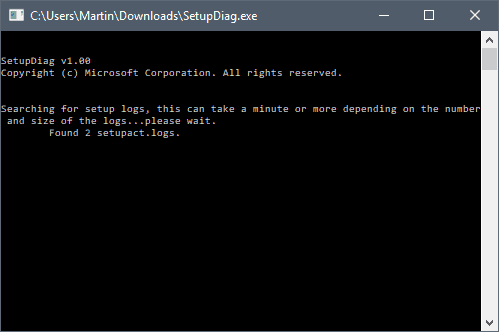
You can run SetupDiag directly after download. If you run it without parameters, it attempts to locate log files that Windows 10 creates during the upgrade process in the default folders on the device.

The program creates a results.log file in its directory when it completes the scan which includes upgrade issues that it detected in the log files during parsing.

SetupDiag creates a zip archive of all log files that it processed on top of that which it saves as Logs.zip in the same directory as well.

The command line window lists those as well, but the window is closed automatically when the program finishes the scan.

Check out our list of Windows 10 upgrade log files to find out more about those. Basically, what SetupDiag does is parse the following directories for log files:

  • \$Windows.~bt\sources\panther
  • \$Windows.~bt\Sources\Rollback
  • \Windows\Panther
  • \Windows\Panther\NewOS

You may run the application in offline mode to parse folders copied from another device. The tool parses one folder only if you copy individual folders, but if you copy the parent folder, it will include all logs found in all directories of the directory structure.

SetupDiag can also be used to debug minidump files that Windows 10 may create during the upgrade process. Windows 10 creates the file setupmem.dmp either in %SystemDrive%$Windows.~bt\Sources\Rollback or in %WinDir%\Panther\NewOS\Rollback depending on when the upgrade process is stopped.

Here are some examples:

  • SetupDiag.exe — the core command. It will run in online mode which means that it tries to find upgrade logs on the target machine in the directories mentioned above.
  • SetupDiag.exe /Output:C:\SetupDiag\Results.log /Mode:Offline /LogsPath:D:\Temp\Logs\LogSet1 – the command runs SetupDiag in offline mode. It will scan the directory LogSet1 for matching log files and issues.
  • SetupDiag.exe /Output:C:\SetupDiag\Dumpdebug.log /Mode:Offline /LogsPath:D:\Dump — the command analyzes the setupmem.dmp file found in d:\dump.

How it works

SetupDiag uses a set of rules files to find matches in upgrade logs. Rules have a name and associated unique identifier.

The reliance on rules means that SetupDiag can only identify issues that are defined in its set of rules. Microsoft lists a total of 26 unique identifiers on the Microsoft Docs website which SetupDiag identifies in its current version.

If the program fails to find the root cause for the upgrade issue, check out our how to analyze Windows 10 upgrade errors guide which offers information on diagnosing issues manually.

Closing Words

SetupDiag may speed up the diagnosing of upgrade related issues on Windows 10 machines significantly. It reduces the time it takes to parse the log files but may still require additional research to repair the detected issue.

Some issues, like not enough disk space, are easy enough to fix but others may require extensive research and repair operations.

Now You: Did you run into Windows 10 upgrade errors in the past?

Summary

Article Name

Use SetupDiag to diagnose Windows 10 upgrade issues

Description

SetupDiag is a free diagnostic tool by Microsoft that is designed to find and parse Windows 10 setup log files to determine why an upgrade or update failed to install on a computer system.

Author

Martin Brinkmann

Publisher

Ghacks Technology News

Logo


Read the Full Article here: >Top 100 Network Security Tools

Facebook admits public data of its 2.2 billion users has been compromised

Facebook dropped another bombshell on its users by admitting that all of its 2.2 billion users should assume malicious third-party scrapers have compromised their public profile information.

On Wednesday, Facebook CEO Mark Zuckerberg revealed that "malicious actors" took advantage of "Search" tools on its platform to discover the identities and collect information on most of its 2 billion users worldwide.

The revelation once again underlines the

failure of the social-media

giant to protect users’ privacy while generating billions of dollars in revenue from the same information.

The revelation came weeks after the disclosure of the

Cambridge Analytica scandal

, wherein personal data of 77 million users was improperly gathered and misused by the political consultancy firm, who reportedly also helped Donald Trump win the US presidency in 2016.

However, the latest scam revealed by the social media giant about the abuse of Facebook’s search tools over the course of several years impacts almost all of its 2.2 billion users, making it the worst year for the world’s largest social network.

"It is clear now that we didn’t do enough, we didn’t focus enough on preventing abuse," Zuckerberg told press reporters. "We didn’t take a broad enough view of what our responsibility is, and that was a huge mistake."

The company said it had disabled the feature—which allows anyone to look up users by entering phone numbers or email addresses into Facebook’s search tool—in its site’s search function that enabled malicious actors to scrape public profile information.

Here’s How Scrapped Data Could Have Helped Cybercriminals

As mentioned above, the source of this scam was Facebook’s search function, which was turned on by default. Hackers took help of "Dark Web," where criminals post personal information of users stolen from data breaches over the years, to collect.

Once they had their hands on email addresses and phone numbers, the hackers then used automated computer programs to feed the email addresses and phone numbers into Facebook’s "search" box.

This scan allowed them to find out the full names of people associated with the email addresses or phone numbers, along with the Facebook profile information they chose to make public, which often includes names, profile photos, and hometown.

This collected information was then more likely to be used by cybercriminals to target particular individual using social engineering or other cyber attacks.

"Until today, people could enter another person’s phone number or email address into Facebook search to help find them. This has been especially useful for finding your friends in languages which take more effort to type out a full name, or where many people have the same name," Facebook Chief Technology Officer Mike Schroepfer said in a blog post describing changes the company has made to its service to protect its users’ data better.

"However, malicious actors have also abused these features to scrape public profile information by submitting phone numbers or email addresses they already have through search and account recovery. Given the scale and sophistication of the activity we’ve seen, we believe most people on Facebook could have had their public profile scraped in this way."

While apologizing "second time" to its users, Zuckerberg said this feature has immediately been turned off, noting that the scraped profile information was only limited to what was publically viewable.

However, Zuckerberg defended gathering users’ data for a business model, arguing "People tell us that if they’re going to see ads, they want the ads to be good."

"On the one hand, people want relevant experiences, and on the other hand there is some discomfort about how data is used," Zuck added. "I think the overwhelming feedback is for wanting a good experience."

Also, it was initially reported that Cambridge Analytica quiz app gathered data on some 50 million Facebook users, but Facebook revised that number upward by 74 percent, i.e., over 77 million.

In an effort to protect its users private data, Facebook is now restricting third-party apps from accessing users’ information about their relationship status, religious or political views, work history, education, habits, interest, video watching, and games—basically almost every information data brokers and businesses collect to build profiles of their customers’ tastes.

The company is all set to roll out a new feature on Monday that will inform users who were affected by the Cambridge Analytica data leak.

Read the Full Article here: >The Hacker News [ THN ]

Facebook admits public data of its 2.2 billion users has been compromised

Facebook dropped another bombshell on its users by admitting that all of its 2.2 billion users should assume malicious third-party scrapers have compromised their public profile information.

On Wednesday, Facebook CEO Mark Zuckerberg revealed that "malicious actors" took advantage of "Search" tools on its platform to discover the identities and collect information on most of its 2 billion users worldwide.

The revelation once again underlines the

failure of the social-media

giant to protect users’ privacy while generating billions of dollars in revenue from the same information.

The revelation came weeks after the disclosure of the

Cambridge Analytica scandal

, wherein personal data of 77 million users was improperly gathered and misused by the political consultancy firm, who reportedly also helped Donald Trump win the US presidency in 2016.

However, the latest scam revealed by the social media giant about the abuse of Facebook’s search tools over the course of several years impacts almost all of its 2.2 billion users, making it the worst year for the world’s largest social network.

"It is clear now that we didn’t do enough, we didn’t focus enough on preventing abuse," Zuckerberg told press reporters. "We didn’t take a broad enough view of what our responsibility is, and that was a huge mistake."

The company said it had disabled the feature—which allows anyone to look up users by entering phone numbers or email addresses into Facebook’s search tool—in its site’s search function that enabled malicious actors to scrape public profile information.

Here’s How Scrapped Data Could Have Helped Cybercriminals

As mentioned above, the source of this scam was Facebook’s search function, which was turned on by default. Hackers took help of "Dark Web," where criminals post personal information of users stolen from data breaches over the years, to collect.

Once they had their hands on email addresses and phone numbers, the hackers then used automated computer programs to feed the email addresses and phone numbers into Facebook’s "search" box.

This scan allowed them to find out the full names of people associated with the email addresses or phone numbers, along with the Facebook profile information they chose to make public, which often includes names, profile photos, and hometown.

This collected information was then more likely to be used by cybercriminals to target particular individual using social engineering or other cyber attacks.

"Until today, people could enter another person’s phone number or email address into Facebook search to help find them. This has been especially useful for finding your friends in languages which take more effort to type out a full name, or where many people have the same name," Facebook Chief Technology Officer Mike Schroepfer said in a blog post describing changes the company has made to its service to protect its users’ data better.

"However, malicious actors have also abused these features to scrape public profile information by submitting phone numbers or email addresses they already have through search and account recovery. Given the scale and sophistication of the activity we’ve seen, we believe most people on Facebook could have had their public profile scraped in this way."

While apologizing "second time" to its users, Zuckerberg said this feature has immediately been turned off, noting that the scraped profile information was only limited to what was publically viewable.

However, Zuckerberg defended gathering users’ data for a business model, arguing "People tell us that if they’re going to see ads, they want the ads to be good."

"On the one hand, people want relevant experiences, and on the other hand there is some discomfort about how data is used," Zuck added. "I think the overwhelming feedback is for wanting a good experience."

Also, it was initially reported that Cambridge Analytica quiz app gathered data on some 50 million Facebook users, but Facebook revised that number upward by 74 percent, i.e., over 77 million.

In an effort to protect its users private data, Facebook is now restricting third-party apps from accessing users’ information about their relationship status, religious or political views, work history, education, habits, interest, video watching, and games—basically almost every information data brokers and businesses collect to build profiles of their customers’ tastes.

The company is all set to roll out a new feature on Monday that will inform users who were affected by the Cambridge Analytica data leak.

Read the Full Article here: >The Hacker News [ THN ]

Q4 2017 DDoS Trends Report: Financial Sector Experienced 40 Percent of Attacks

Verisign’s Q4 2017 DDoS Trends Report – Volume 4, Issue 4, 4th Quarter 2017
Click to Download
Verisign has released its Q4 2017 DDoS Trends Report, which represents a unique view into the attack trends unfolding online, through observations and insights derived from distributed denial of service (DDoS) attack mitigations enacted on behalf of Verisign DDoS Protection Services and security research conducted by Verisign Security Services.

The largest volumetric and highest intensity DDoS attack observed by Verisign in Q4 2017 was a multi-vector attack that peaked at approximately 53 Gigabits per second (Gbps) and around 5 Million packets per second (Mpps). The attack consisted of a wide range of attack vectors including TCP SYN and TCP RST floods, DNS amplification attacks, Internet Control Message Protocol (ICMP) floods, and invalid packets.

Mitigation Peaks by Quarter from Q1 2016 to Q4 2017

Key DDoS Trends and Observations:

  • Forty-two percent of DDoS attacks were User Datagram Protocol (UDP) floods.
  • Eighty-two percent of DDoS attacks mitigated by Verisign in Q4 2017 employed multiple attack types.
  • The Financial industry, representing 40 percent of mitigation activity, was the most frequently targeted industry for Q4 2017. The IT/Cloud/SaaS industry, previously the most targeted industry, experienced the second highest number of DDoS attacks, representing 33 percent of mitigation activity.

Collaboration is Critical for Effective DDoS Mitigation

Collaboration is vital for effective distributed denial of service (DDoS) mitigation. A mitigation response could often benefit from the involvement of a number of stakeholders. In an ideal scenario, all groups could work to mitigate the DDoS attack and bring the organization’s critical systems back to optimal levels as quickly as possible. This level of complex coordination has traditionally been carried out using telephones and emails. However, there are other options for mitigation providers to help facilitate automated collaboration during a DDoS mitigation. A standard method of signaling for mitigation assistance upstream could simplify and streamline the process of coordinating the many components usually deployed in a DDoS mitigation. This is where DDoS Open Threat Signaling (DOTS) comes into play.

Read the report to learn more about DDoS Open Threat Signaling.

For more DDoS Trends in Q4 2017, download the full report, and be sure to check back in a few months when we release our Q1 2018 DDoS Trends Report.

Read the Full Article here: >CircleID – Cybercrime News, Opinions and Blogs

Microsoft Won’t Patch a Severe Skype Vulnerability Anytime Soon

A serious vulnerability has been discovered in Microsoft-owned most popular free web messaging and voice calling service Skype that could potentially allow attackers to gain full control of the host machine by granting system-level privileges to a local, unprivileged user.

The worst part is that this vulnerability will not be patched by Microsoft anytime soon.

It’s not because the flaw is unpatchable, but because fixing the vulnerability requires a significant software rewrite, which indicates that the company will need to issue an all-new version of Skype rather than just a patch.

The vulnerability has been

discovered

and reported to Microsoft by security researcher Stefan Kanthak and resides in Skype’s update installer, which is susceptible to Dynamic Link Libraries (DLL) hijacking.

According to the researcher, a potential attacker could exploit the “functionality of the Windows DLL loader where the process loading the DLL searches for the DLL to be loaded first in the same directory in which the process binary resides and then in other directories.”

The exploitation of this preferential search order would allow the attacker to hijack the update process by downloading and placing a malicious version of a DLL file into a temporary folder of a Windows PC and renaming it to match a legitimate DLL that can be modified by an unprivileged user without having any special account privileges.

When Skype’s update installer tries to find the relevant DLL file, it will find the malicious DLL first, and thereby will install the malicious code.

Although Kanthak demonstrated the attack using the Windows version of Skype, he believes the same DLL hijacking method could also work against other operating systems, including Skype versions for macOS and Linux.

Kanthak informed Microsoft of the Skype vulnerability back in September, but the company told him that the patch would require the Skype update installer go through “a large code revision,” Kanthak

told

ZDNet.

So rather than releasing a security update, Microsoft decided to build an altogether new version of the Skype client that would address the vulnerability.

It should be noted that this vulnerability only affects the Skype for the desktop app, which uses its update installer which is vulnerable to the DLL hijacking technique. The Universal Windows Platform (UWP) app version available from the Microsoft Store for Windows 10 PCs is not affected.

The vulnerability has been rated as “medium” in severity, but Kanthak said, “the attack could be easily weaponized.” He gave two examples, which have not been released yet.

Until the company issues an all-new version of Skype client, users are advised to exercise caution and avoid clicking on attachments provided in an email. Also, make sure you run appropriate and updated anti-virus software that offers some defence against such attacks.

This is not the first time Skype has been dealing with a severe security flaw. In June 2017, a

critical flaw in Skype

was revealed before Microsoft released a fix for the issue that allowed hackers to crash systems and execute malicious code in them.

Last month, among several messaging applications, Skype was also dealing with a critical remote code execution

vulnerability in Electron

—a popular web application framework widely-used in desktop applications.

Read the Full Article here: >The Hacker News [ THN ]

Hackers Exploit ‘Telegram Messenger’ Zero-Day Flaw to Spread Malware

A zero-day vulnerability has been discovered in the desktop version for end-to-end encrypted Telegram messaging app that was being exploited in the wild in order to spread malware that mines cryptocurrencies such as Monero and ZCash.

The Telegram vulnerability was uncovered by security researcher Alexey Firsh from Kaspersky Lab last October and affects only the Windows client of Telegram messaging software.

The flaw has actively been exploited in the wild since at least March 2017 by attackers who tricked victims into downloading malicious software onto their PCs that used their CPU power to mine cryptocurrencies or serve as a backdoor for attackers to remotely control the affected machine, according to a

blogpost

on Securelist.

Here’s How Telegram Vulnerability Works

The vulnerability resides in the way Telegram Windows client handles the RLO (right-to-left override) Unicode character (U+202E), which is used for coding languages that are written from right to left, like Arabic or Hebrew.

According to Kaspersky Lab, the malware creators used a hidden RLO Unicode character in the file name that reversed the order of the characters, thus renaming the file itself, and send it to Telegram users.

For example, when an attacker sends a file named "photo_high_re*U+202E*gnp.js" in a message to a Telegram user, the file’s name rendered on the users’ screen flipping the last part.

Therefore, the Telegram user will see an incoming PNG image file (as shown in the below image) instead of a JavaScript file, misleading into downloading malicious files disguised as the image.

"As a result, users downloaded hidden malware which was then installed on their computers," Kaspersky says in its press release published today.

Kaspersky Lab reported the vulnerability to Telegram and the company has since patched the vulnerability in its products, as the Russian security firm said: "at the time of publication, the zero-day flaw has not since been observed in messenger’s products."

Hackers Used Telegram to Infect PCs with Cryptocurrency Miners

During the analysis, Kaspersky researchers found several scenarios of zero-day exploitation in the wild by threat actors. Primarily, the flaw was actively exploited to deliver cryptocurrency mining malware, which uses the victim’s PC computing power to mine different types of cryptocurrency including Monero, Zcash, Fantomcoin, and others.

While analyzing the servers of malicious actors, the researchers also found archives containing a Telegram’s local cache that had been stolen from victims.

In another case, cybercriminals successfully exploited the vulnerability to install a backdoor trojan that used the Telegram API as a command and control protocol, allowing hackers to gain remote access to the victim’s computer.

"After installation, it started to operate in a silent mode, which allowed the threat actor to remain unnoticed in the network and execute different commands including the further installation of spyware tools," the firm added.

Firsh believes the zero-day vulnerability was exploited only by Russian cybercriminals, as "all the exploitation cases that [the researchers] detected occurring in Russia," and a lot of artifacts pointed towards Russian cybercriminals.

The best way to protect yourself from such attacks is not to download or open files from unknown or untrusted sources.

The security firm also recommended users to avoid sharing any sensitive personal information in messaging apps and make sure to have a good antivirus software from reliable company installed on your systems.

Read the Full Article here: >The Hacker News [ THN ]

Hackers Exploit ‘Telegram Messenger’ Zero-Day Flaw to Spread Malware

A zero-day vulnerability has been discovered in the desktop version for end-to-end encrypted Telegram messaging app that was being exploited in the wild in order to spread malware that mines cryptocurrencies such as Monero and ZCash.

The Telegram vulnerability was uncovered by security researcher Alexey Firsh from Kaspersky Lab last October and affects only the Windows client of Telegram messaging software.

The flaw has actively been exploited in the wild since at least March 2017 by attackers who tricked victims into downloading malicious software onto their PCs that used their CPU power to mine cryptocurrencies or serve as a backdoor for attackers to remotely control the affected machine, according to a

blogpost

on Securelist.

Here’s How Telegram Vulnerability Works

The vulnerability resides in the way Telegram Windows client handles the RLO (right-to-left override) Unicode character (U+202E), which is used for coding languages that are written from right to left, like Arabic or Hebrew.

According to Kaspersky Lab, the malware creators used a hidden RLO Unicode character in the file name that reversed the order of the characters, thus renaming the file itself, and send it to Telegram users.

For example, when an attacker sends a file named "photo_high_re*U+202E*gnp.js" in a message to a Telegram user, the file’s name rendered on the users’ screen flipping the last part.

Therefore, the Telegram user will see an incoming PNG image file (as shown in the below image) instead of a JavaScript file, misleading into downloading malicious files disguised as the image.

"As a result, users downloaded hidden malware which was then installed on their computers," Kaspersky says in its press release published today.

Kaspersky Lab reported the vulnerability to Telegram and the company has since patched the vulnerability in its products, as the Russian security firm said: "at the time of publication, the zero-day flaw has not since been observed in messenger’s products."

Hackers Used Telegram to Infect PCs with Cryptocurrency Miners

During the analysis, Kaspersky researchers found several scenarios of zero-day exploitation in the wild by threat actors. Primarily, the flaw was actively exploited to deliver cryptocurrency mining malware, which uses the victim’s PC computing power to mine different types of cryptocurrency including Monero, Zcash, Fantomcoin, and others.

While analyzing the servers of malicious actors, the researchers also found archives containing a Telegram’s local cache that had been stolen from victims.

In another case, cybercriminals successfully exploited the vulnerability to install a backdoor trojan that used the Telegram API as a command and control protocol, allowing hackers to gain remote access to the victim’s computer.

"After installation, it started to operate in a silent mode, which allowed the threat actor to remain unnoticed in the network and execute different commands including the further installation of spyware tools," the firm added.

Firsh believes the zero-day vulnerability was exploited only by Russian cybercriminals, as "all the exploitation cases that [the researchers] detected occurring in Russia," and a lot of artifacts pointed towards Russian cybercriminals.

The best way to protect yourself from such attacks is not to download or open files from unknown or untrusted sources.

The security firm also recommended users to avoid sharing any sensitive personal information in messaging apps and make sure to have a good antivirus software from reliable company installed on your systems.

Read the Full Article here: >The Hacker News [ THN ]

Download: The 2017 State of Endpoint Security Risk Report

To determine the cost and impact of evolving threats, the Ponemon Institute, a preeminent research center dedicated to data privacy and protection, surveyed 665 IT and security leaders.

The 2017 State of Endpoint Security Risk Report

Their responses indicate today’s organizations are struggling to secure their endpoints, and paying a steep cost for each successful attack — $5 million for a large organization or an average of $301 per employee.

Get the full report here.

Attacks are evolving

This year, over 40% of US businesses were compromised due to fileless attacks and exploits. Overwhelmingly, respondents cited that over-reliance on traditional endpoint security has left organizations exposed to significant risk. Report findings include:

  • 54% of businesses were comprised in 2017.
  • Fileless attacks are almost 10x more likely to succeed than file-based attacks.
  • False positive rates for existing endpoint security solutions are nearing 50%.
  • A successful attack costs an organization on average $301 per employee — or over $5million for a large organization.

Read the Full Article here: >Help Net Security – News

Domain Theft Strands Thousands of Web Sites

Newtek Business Services Corp. [NASDAQ:NEWT], a Web services conglomerate that operates more than 100,000 business Web sites and some 40,000 managed technology accounts, had several of its core domain names stolen over the weekend. The theft shut off email and stranded Web sites for many of Newtek’s customers.

An email blast Newtek sent to customers late Saturday evening made no mention of a breach or incident, saying only that the company was changing domains due to “increased” security. A copy of that message can be read here (PDF).

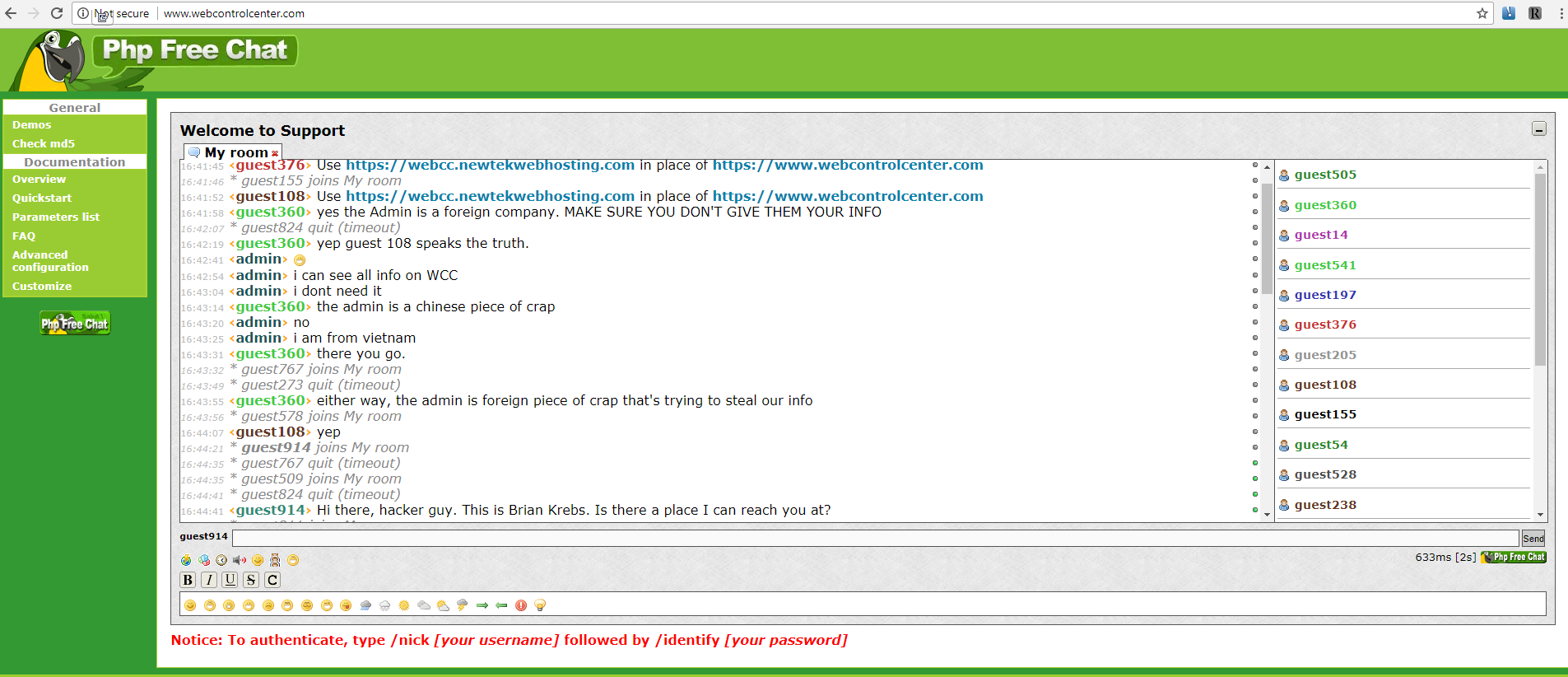
In reality, three of their core domains were hijacked by a Vietnamese hacker, who replaced the login page many Newtek customers used to remotely manage their Web sites (webcontrolcenter[dot]com) with a live Web chat service. As a result, Newtek customers seeking answers to why their Web sites no longer resolved correctly ended up chatting with the hijacker instead.

The PHP Web chat client that the intruder installed on Webcontrolcenter[dot]com, a domain that many Newtek customers used to manage their Web sites with the company. The perpetrator can be seen in this chat using the name “admin.” Click to enlarge.

In a follow-up email sent to customers 10 hours later (PDF), Newtek acknowledged the outage was the result of a “dispute” over three domains, webcontrolcenter[dot]com, thesba[dot]com, and crystaltech[dot]com.

“We strongly request that you eliminate these domain names from all your corporate or personal browsers, and avoid clicking on them,” the company warned its customers. “At this hour, it has become apparent that as a result over the dispute for these three domain names, we do not currently have control over the domains or email coming from them.”

The warning continued: “There is an unidentified third party that is attempting to chat and may engage with clients when visiting the three domains. It is imperative that you do not communicate or provide any sensitive data at these locations.”

Newtek did not respond to requests for comment.

Domain hijacking is not a new problem, but it can be potentially devastating to the victim organization. In control of a hijacked domain, a malicious attacker could seamlessly conduct phishing attacks to steal personal information, or use the domain to foist malicious software on visitors.

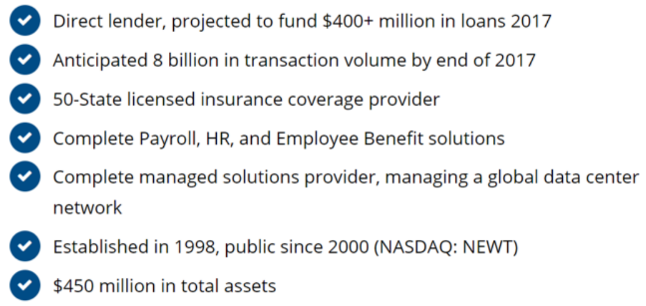
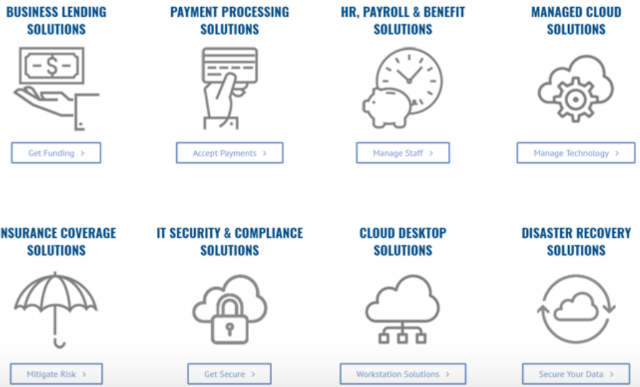
Newtek is not just a large Web hosting firm: It aims to be a one-stop shop for almost any online service a small business might need. As such, it’s a mix of very different business units rolled up into one since its founding in 1998, including lending solutions, HR, payroll, managed cloud solutions, group health insurance and disaster recovery solutions.

“NEWT’s tentacles go deep into their client’s businesses through providing data security, human resources, employee benefits, payments technology, web design and hosting, a multitude of insurance solutions, and a suite of IT services,” reads a Sept. 2017 profile of the company at SeekingAlpha, a crowdsourced market analysis publication.

Newtek’s various business lines. Source: Newtek.

Reached via the Web chat client he installed at webcontrolcenter[dot]com, the person who claimed responsibility for the hijack said he notified Newtek five days ago about a “bug” he found in the company’s online operations, but that he received no reply.

A Newtek customer who resells the company’s products to his clients said he had to spend much of the weekend helping clients regain access to email accounts and domains as a result of the incident. The customer, who asked to remain anonymous, said he was shocked that Newtek made little effort to convey the gravity of the hijack to its customers — noting that the company’s home page still makes no mention of the incident.

“They also fail to make it clear that any data sent to any host under the domain could be recorded (email passwords, web credentials, etc.) by the attacker,” he said. “I’m floored at how bad their communication was to their users. I’m not surprised, but concerned, that they didn’t publish the content in the emails directly on their website.”

The source said that at a minimum Newtek should have expired all passwords immediately and required resets through non-compromised hosts.

“And maybe put a notice about this on their home page instead of relying on email, because a lot of my customers can’t get email right now as a result of this,” the source said.

There are a few clues that suggest the perpetrator of these domain hijacks is indeed being truthful about both his nationality and that he located a bug in Newtek’s service. Two of the hijacked domains were moved to a Vietnamese domain registrar (inet.vn).

This individual gave me an email address to contact him at — hd2416@gmail.com — although he has so far not responded to questions beyond promising to reply in Vietenamese. The email is tied to two different Vietnamese-language social networking profiles.

A search at Domaintools indicates that this address is linked to the registration records for four domains, including one (giakiemnew[dot]com) that was recently hosted on a dedicated server operated by Newtek’s legacy business unit Crystaltek [full disclosure: Domaintools is an advertiser on this site]. Recall that Crystaltek[dot]com was among the three hijacked domains.

In addition, the domain giakiemnew[dot]com was registered through Newtek Technology Services, a domain registration service offered by Newtek. This suggests that the perpetrator was in fact a customer of Newtek, and perhaps did discover a vulnerability while using the service.

Read the Full Article here: >Krebs on Security