Dbinbox: Enable anonymous uploads to your Dropbox

Dropbox is one of the most popular file synchronization and cloud hosting services on today’s Internet.


Dbinbox is a third party open source service that enables anonymous uploads on Dropbox. What is meant by that is that you can use their web service afterwards – without signing in if you want – to upload files to your Dropbox account.


Read More

Tech Terminology De-mystified – Big Data

Big data usually includes data sets with sizes beyond the ability of commonly used software tools to capture, curate, manage, and process the data within a tolerable elapsed time. Big data sizes are a constantly moving target, as of 2012 ranging from a few dozen terabytes to many petabytes of data in a single data set. The target moves due to constant improvement in traditional DBMS technology as well as new databases like NoSQL and their ability to handle larger amounts of data. With this difficulty, new platforms of “big data” tools are being developed to handle various aspects of large quantities of data.
Continue reading “Tech Terminology De-mystified – Big Data”

Is Mobile “insecurity” the “in” thing ?

On 22nd May, CTIA-The Wireless Association® released its consumer survey on users’ attitudes toward cybersecurity.


Commissioned by CTIA, the Harris Interactive survey shows that 85 percent of consumers know their mobile devices are very or somewhat vulnerable, 74 percent say keeping their devices secure is their responsibility, but many don’t take action.


However, consumers are more likely to be aware and protect themselves against a tangible threat, such as having a device stolen, than intangible threat such as malware or hacking. The consumers whose devices were lost or stolen were more likely to use PINs or passwords than those who didn’t have their devices lost or stolen (69 percent versus 47 percent), but no more likely to take any other proactive actions, such as remote locking, tracking and/or erasing apps (45 percent versus 41 percent).


Continue reading “Is Mobile “insecurity” the “in” thing ?”

Mailstore Home 7.1: Email backup software update available

Mailstore Home is my go-to software when it comes to backing up email and migrating email between programs and computer systems. I’m using it to speed up Thunderbird by backing up and removing old emails from the application to lighten its load, and to backup Gmail, Hotmail or Yahoo Emails.

The developers of Mailstore have just released version 7.1 of the program introducing official support for Microsoft’s Windows 8 operating system. This is the only new feature addition to the application. Four additional changes have been made to the program, of which two are bug fixes for issues that some users may have encountered while using the application.

  • The authentication mechanism Digest MD5 is no longer usable in combination with the IMAP protocol
  • Changed E-mail messages that (because of an error) still exist in the search index, but not in the database, are longer contained in search results
  • Fixed Debug log files have an incorrect name under certain circumstances
  • Fixed Outlook MSG files whose Internet Headers property does not end with a line break can’t be read by MailStore

Original article at Ghacks

How to restore individual files from System Restore points

Today I noticed that all of the files that I had saved on the desktop in Windows 7 were gone. The only icon that I saw on the desktop was the Recycle Bin. Since I needed to access the files, I started to investigate the issue. First thing that I did check was to make sure that I had not unchecked the show desktop files option. I verified that despite the fact that I saw the Recycle Bin icon on the desktop.

The option to show desktop icons was checked, so that was not it. Next thing on the list was to search for the files on the system, which turned up that they were not anymore on it. I also fired up Office 2013 to load some of the recent files but that did result in an error message that the documents could not be found on the system, and that I should check whether they had been moved.

Research on the Internet showed me that I was not the only user with the issue. Not all issues were resolved in the various forum threads on the Internet, but some solutions included scanning the file with up to date antivirus software to make sure that malware was not to blame for the disappearance of files on the desktop.

Scans with Malwarebytes Anti-Malware and Dr. Web Cure It did not find malware on the system that could have been responsible for the removal of the desktop files.

Next try System Restore. I had multiple System Restore points at my disposal. The last ones were created after Windows Updates, the installation of the ramdisk software, and SlimCleaner.

I restored the points but the desktop items did not return. Last chance file recovery right? Recuva found some of the documents but not all. I was about to give up when I decided to browse some of the System Restore points just to find out if one of them had the documents listed. They should have, considering that I have been working with the documents yesterday.

I have used System Restore Explorer for that. You can use the program to mount system restore points so that you can browse and restore individual files.
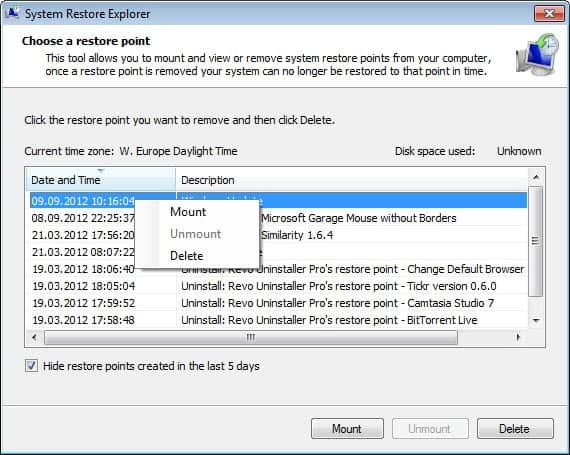
restore individual system restore files

And guess what, the first system restore backup that I mounted contained the files and folders that I had stored on the desktop. I’m not entirely sure why the files have not been recovered when I restored the backup that contained them though. It could be a issue with files on the desktop, but that is just a guess. I can create new icons and files on the desktop, and they remain there even after reboots.

system restore files

I already did a sfc /scannow on the console to make sure that no important files were corrupted that caused this. I also checked the disk which required no repairs as well.

If you have an idea what could have caused this let me know please, I’d really like to find an answer for the issue. I’m also not sure why restoring the System Restore point did not restore the files on the desktop, as they were included in the backup.


Original article at Ghacks